

eSIM True 5G
แพ็กเกจ 7 วัน
-
อินเทอร์เน็ตความเร็วสูง 15GB ใช้งานได้ 7 วัน
-
เมื่อใช้ครบแล้ว ความเร็วจะลดลงเหลือ 1 Mbps แต่ยังสามารถใช้อินเทอร์เน็ตได้ต่อเนื่อง
-
รับสายและรับข้อความได้ฟรี
-
ไม่รองรับการโทรออกและการส่ง SMS
แพ็กเกจ 10 วัน
-
อินเทอร์เน็ตความเร็วสูง 50GB ใช้งานได้ 10 วัน
-
เมื่อใช้ครบแล้ว ความเร็วจะลดลงเหลือ 384 kbps แต่ยังสามารถใช้อินเทอร์เน็ตได้ต่อเนื่อง
-
รับสายและรับข้อความได้ฟรี
-
ไม่รองรับการโทรออกและการส่ง SMS
ข้อกำหนดอุปกรณ์
-
ต้องใช้ iOS 12.1 หรือเวอร์ชันใหม่กว่า โปรดทราบว่า iPhone ที่จำหน่ายในจีนแผ่นดินใหญ่ ฮ่องกง และมาเก๊า ไม่รองรับ eSIM
- รองรับโทรศัพท์ Android เพียงรุ่นจำกัด จึงแนะนำให้ใช้เฉพาะ iPhone เท่านั้น*
How to Use
How to Use
This TrueMove Thailand eSIM provides a smooth and convenient internet experience. Produced by TrueMove, it ensures stable signal quality and strong network coverage. There is no need to enable data roaming—you can use it directly and easily access the internet.
– Precautions –
TrueMove number usage limitation:
To ensure the eSIM works properly, please avoid activating two TrueMove numbers on the same phone at the same time (including roaming with the same number).
Switching your primary SIM to another Thai carrier:
If you need to use your main SIM card number at the same time, it is recommended that you manually switch your primary SIM to another Thai telecommunications provider (such as AIS) to avoid network interference.
– Friendly Reminder –
For the best internet experience, it is recommended to activate the eSIM after arriving in Thailand to avoid scanning and installing it in advance, which may cause the validity period to start earlier than intended.
If you encounter any issues, please contact customer service first. Do not delete the eSIM, because once it is deleted, TrueMove Telecom will not be able to check the number status or reissue the eSIM.
If your primary number automatically connects to a TrueMove base station, this TrueMove tourist eSIM may experience network interruptions. This is because roaming services automatically switch to the telecommunications network with the best signal based on your location. Thai telecommunications regulations allow only one SIM card per phone to be registered with the same telecommunications base station.
– How to Check Network Usage and Balance –
To check your remaining data balance, dial *900#.
To check your phone number, dial *833#.
To make calls and send SMS, please bring your passport to an offline True store to complete real-name registration. After the registration is completed, the eSIM will no longer have restrictions, and you can make calls and send messages by topping up additional credit.
วิธีการใช้งาน
ซิมการ์ดอิเล็กทรอนิกส์ Truemove จากประเทศไทยนี้ มอบประสบการณ์การใช้งานอินเทอร์เน็ตที่ราบรื่น! ผลิตโดย Truemove รับประกันคุณภาพสัญญาณเสถียรและแรงสัญญาณยอดเยี่ยม ไม่ต้องเปิดใช้งานดาต้าโรมมิ่ง สามารถใช้งานได้โดยตรงและเข้าถึงอินเทอร์เน็ตได้อย่างง่ายดาย
-ข้อควรระวัง-
- ข้อจำกัดการใช้งานหมายเลข Truemove เพียงหมายเลขเดียว: เพื่อให้ eSIM ทำงานได้อย่างถูกต้อง โปรดหลีกเลี่ยงการเปิดใช้งานหมายเลข Truemove สองหมายเลข (รวมถึงการใช้งานโรมมิ่งด้วยหมายเลขเดิม) พร้อมกันในโทรศัพท์ของคุณ
- การเปลี่ยนหมายเลขซิมการ์ดหลักของคุณไปยังผู้ให้บริการโทรคมนาคมไทยรายอื่น: หากคุณจำเป็นต้องใช้หมายเลขซิมการ์ดหลักของคุณในเวลาเดียวกัน ขอแนะนำให้เปลี่ยนหมายเลขซิมการ์ดหลักของคุณไปยังผู้ให้บริการโทรคมนาคมไทยรายอื่น (เช่น AIS) ด้วยตนเอง เพื่อหลีกเลี่ยงการรบกวนของเครือข่าย
-คำเตือนที่เป็นมิตร-
- เพื่อให้ได้รับประสบการณ์การใช้งานอินเทอร์เน็ตที่ดีที่สุด เราขอแนะนำให้คุณเปิดใช้งาน eSIM หลังจากเดินทางถึงประเทศไทยแล้ว เพื่อหลีกเลี่ยงการสแกนและติดตั้งล่วงหน้า และการคำนวณระยะเวลาใช้งานก่อนกำหนด
- หากพบปัญหาใดๆ โปรดติดต่อฝ่ายบริการลูกค้าก่อน อย่าลบ eSIM หากลบ eSIM แล้ว Truemove Telecom จะไม่สามารถช่วยเหลือในการตรวจสอบสถานะหมายเลขหรือออก eSIM ใหม่ได้
- หากหมายเลขหลักของคุณเชื่อมต่อกับสถานีฐาน Truemove โดยอัตโนมัติ ซิมการ์ด Truemove eSIM สำหรับนักท่องเที่ยวนี้อาจประสบปัญหาการหยุดชะงักของเครือข่าย เนื่องจากบริการโรมมิ่งจะสลับไปยังเครือข่ายโทรคมนาคมที่มีสัญญาณดีที่สุดโดยอัตโนมัติ ขึ้นอยู่กับตำแหน่งของคุณ บริษัทโทรคมนาคมแห่งประเทศไทยอนุญาตให้ลงทะเบียนซิมการ์ดเพียงหนึ่งซิมต่อโทรศัพท์หนึ่งเครื่องกับสถานีฐานโทรคมนาคมเดียวกันเท่านั้น
– วิธีตรวจสอบการใช้งานและยอดคงเหลือของเครือข่าย –
- หากต้องการตรวจสอบปริมาณแบนด์วิดท์เครือข่ายที่เหลืออยู่ ให้กด *900#
- หากต้องการสอบถามหมายเลขโทรศัพท์ ให้กด *8 3 3 #
- ในการโทรออกและส่งข้อความ โปรดนำหนังสือเดินทางของคุณไปที่ร้าน True สาขาออฟไลน์เพื่อลงทะเบียนด้วยชื่อจริง หลังจากลงทะเบียนสำเร็จแล้ว eSIM จะไม่มีข้อจำกัดใดๆ และคุณสามารถโทรออกและส่งข้อความได้โดยการเติมเงินเพิ่มเติม
Terms and Conditions Before Purchase
ข้อกำหนดและเงื่อนไขก่อนการสั่งซื้อ
- โปรดยืนยันว่าโทรศัพท์มือถือรุ่นของคุณรองรับบริการ eSIM ก่อนซื้อ สินค้านี้ไม่สามารถขอคืนเงินได้หลังจากส่งรหัส eSIM QR แล้ว
- โปรดปฏิบัติตามคำแนะนำในการติดตั้ง อย่าออกจากหน้าจอระหว่างการติดตั้ง เพื่อหลีกเลี่ยงความผิดพลาดในการตัดสินใจและการลบแพ็กเกจ eSIM ของโทรศัพท์
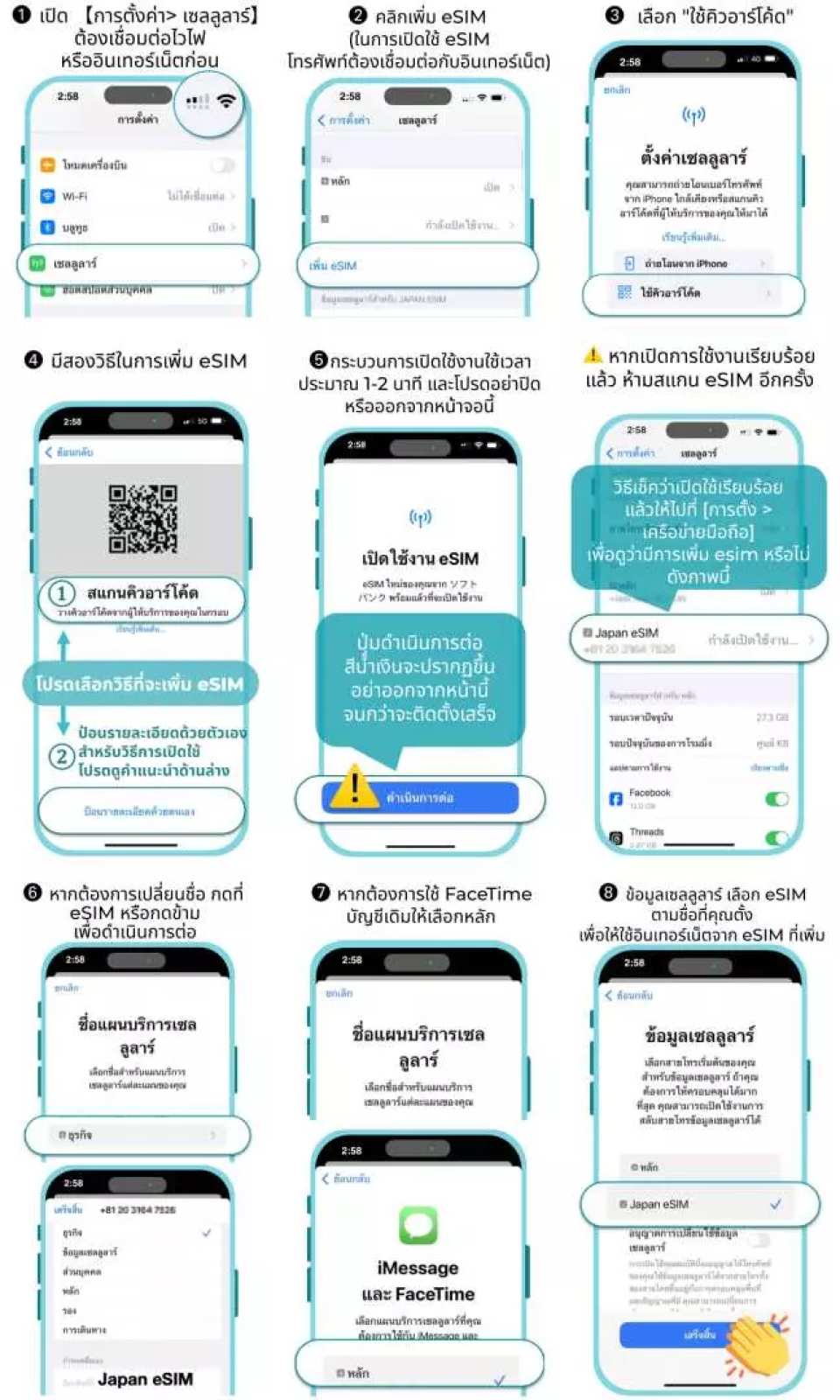
- ก่อนติดตั้ง eSIM โปรดตรวจสอบให้แน่ใจว่าคุณเชื่อมต่อกับ Wi-Fi หรือเครือข่ายมือถือที่ใช้งานได้ จากนั้นสแกนคิวอาร์โค้ดเพื่อเข้าร่วมแพ็กเกจมือถือ สามารถติดตั้ง eSIM ได้ก่อนถึงจุดหมายปลายทาง และเปิดใช้งานเมื่อถึงจุดหมายปลายทาง
- สามารถสแกน QRcode ได้เพียงครั้งเดียวด้วยโทรศัพท์มือถือ หลังจากผูกแล้ว จะไม่สามารถเปลี่ยนแปลงหรือลบอุปกรณ์ได้ เมื่อลบแล้ว จะไม่สามารถสแกนและติดตั้งใหม่ได้ และจำเป็นต้องซื้ออีกครั้ง
- หากข้อความแสดงข้อผิดพลาดปรากฏขึ้นหลังจากการสแกน ไม่ได้หมายความว่า esim ไม่ถูกต้อง โปรดรีสตาร์ทโทรศัพท์ของคุณและไปที่หน้าบริการมือถือเพื่อตรวจสอบว่า esim ถูกผูกเข้ากับโทรศัพท์ของคุณหรือไม่ หรือติดต่อฝ่ายบริการลูกค้าเพื่อขอความช่วยเหลือ อย่าสแกน QR code อื่นๆ โดยไม่ได้รับอนุญาต ซึ่งจะทำให้ esim ถูกผูกซ้ำและทำให้ esim ไม่ถูกต้อง
- หากแผน eSIM ไม่ได้ถูกใช้งานจนเต็มหรือแผนถูกลบออกโดยไม่ได้รับการอนุมัติจากเจ้าหน้าที่บริการลูกค้า จะไม่มีการออกใหม่หรือคืนเงินใดๆ ทั้งสิ้น
- หลังจากสแกนและติดตั้ง eSIM แล้ว ระยะเวลาใช้งานได้จะเริ่มคำนวณตามโซนเวลาท้องถิ่น (หนึ่งวันจะคำนวณจากเวลาเปิดทำการของวันนั้น ๆ ถึง 24.00 น. ของวันนั้น ๆ ) โปรดติดตั้ง eSIM ในวันออกเดินทางเพื่อหลีกเลี่ยงการคำนวณระยะเวลาที่ใช้งานได้ล่วงหน้า
- eSIM นี้เป็นบัตรเติมเงินท้องถิ่นในประเทศไทย เมื่อติดตั้งนอกประเทศไทย อาจแสดงข้อความ “เปิดใช้งาน” หรือ “เปิดใช้งานล้มเหลว” โปรดอย่าลบ eSIM (จะไม่ถูกออกใหม่หลังจากการลบ) เพียงเปิดใช้งาน eSIM แล้ว ประเทศไทย ระยะเวลาจะคำนวณตามวันที่เปิดใช้งานการสแกนครั้งแรก
- สามารถเก็บ eSIM ที่ไม่ได้สแกนไว้ได้ 180 วัน เมื่อสแกนแล้ว จะต้องเปิดใช้งานภายใน 30 วัน หลังจากนั้น eSIM จะหมดอายุโดยอัตโนมัติและไม่สามารถขอคืนเงินหรือขยายเวลาได้
- iOS ต้องใช้เวอร์ชัน 12.1 ขึ้นไป โปรดทราบว่า iPhone ที่จำหน่ายในจีนแผ่นดินใหญ่ ฮ่องกง และมาเก๊า ไม่รองรับ eSIM
- คุณภาพของเครือข่ายโทรคมนาคมในแต่ละประเทศแตกต่างกัน การก่อสร้างสถานีฐานไม่ได้หนาแน่นเท่ากับในไต้หวัน ภูมิภาคและโครงสร้างโทรคมนาคมของแต่ละประเทศมีความแตกต่างกัน เราขออภัยที่ไม่สามารถขอคืนเงินได้เนื่องจากสภาพสัญญาณในบางพื้นที่ หากคุณพบปัญหาสัญญาณไม่ดี คุณสามารถเปลี่ยนไปใช้ผู้ให้บริการโทรคมนาคมด้วยตนเองได้ วิธีการเปลี่ยนไปใช้ผู้ให้บริการโทรคมนาคม: เลือกเครือข่าย/ผู้ให้บริการโทรคมนาคม > ปิดอัตโนมัติ > หลังจากค้นหาแล้ว คุณจะมีผู้ให้บริการโทรคมนาคมหลายรายให้เลือก
- ผลิตภัณฑ์นี้ใช้ IP โรมมิ่งระหว่างประเทศ แอป Android บางตัวอาจไม่สามารถใช้งานได้เนื่องจากตำแหน่ง IP (เช่น TikTok/Douyin/Alipay/Amap/Meituan/Mini Program/ChatGPT…ฯลฯ)
- หากไม่สามารถใช้งานได้เมื่อถึงจุดหมายปลายทาง กรุณาติดต่อฝ่ายบริการลูกค้าค่ะ เราไม่สามารถให้บริการหลังการขายได้หลังจากคุณกลับถึงบ้าน
How To Buy
1. Choose your package
Select the internet speed package, number of days you want to use, and the quantity.
2. Make a payment using one of the following methods:
2.1) Bank transfer*
2.2) Credit or debit card
2.3) Payment agents (FamilyMart, TrueMoney, Big C, mPay, CenPay, Pay@Post)*
* Payment must be completed within 24 hours.
3. For bank transfer payments
Please confirm your payment using the link below.
(If you pay using other methods, payment confirmation is not required. You may skip this step.)
4. Receive your eSIM QR Code
The QR Code for eSIM registration will be sent to your email.
1. เลือกแพ็กเกจ
เลือกประเภทแพ็กเกจ ความเร็วอินเทอร์เน็ต จำนวนวันที่ต้องการใช้งาน และจำนวนที่ต้องการซื้อ
2. ชำระเงิน โดยเลือกวิธีใดวิธีหนึ่งต่อไปนี้
2.1) โอนเงินเข้าบัญชีธนาคาร*
2.2) ชำระด้วยบัตรเครดิตหรือบัตรเดบิต
2.3) ชำระผ่านตัวแทนรับชำระเงิน (Family Mart, TrueMoney, Big C, mPay, CenPay, Pay@Post)*
* ต้องชำระเงินภายใน 24 ชั่วโมง
3. กรณีโอนเงินผ่านธนาคาร
กรุณายืนยันการชำระเงินผ่านลิงก์ด้านล่าง
(หากชำระด้วยวิธีอื่น ไม่จำเป็นต้องยืนยันการชำระเงิน สามารถข้ามขั้นตอนนี้ได้)
4. รับ QR Code สำหรับลงทะเบียน eSIM
ระบบจะส่ง QR Code สำหรับลงทะเบียน eSIM ทางอีเมล
Contact Us
Need help? Email: [email protected] หรือ Line@ 
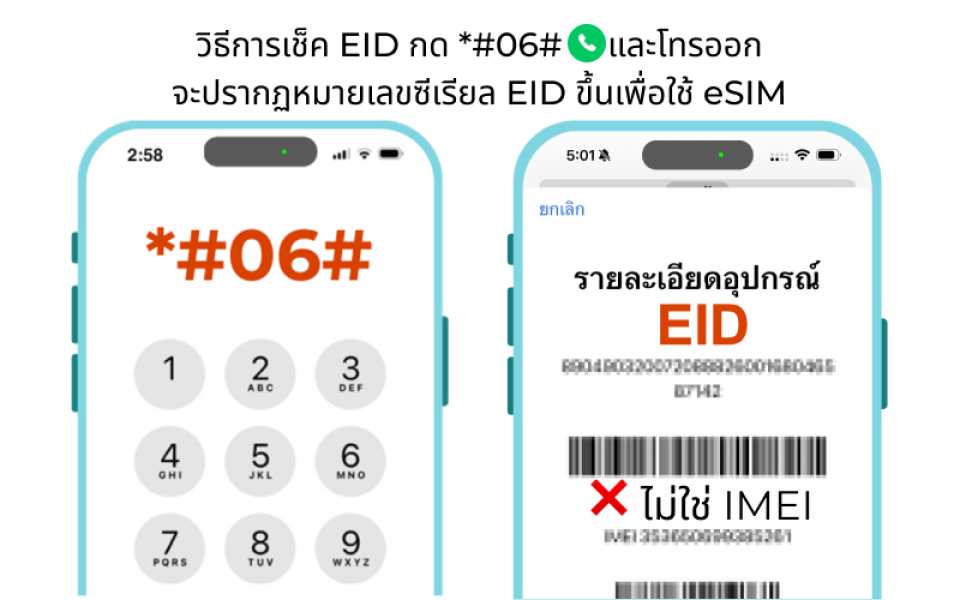
How to Check Your EID
Steps to Install and Activate an eSIM


 Thai
Thai  English